
Last Updated: 11.11.2026
99math is an interactive online maths learning platform that allows teachers to host multiplayer games, students to practise mathematical skills, and parents to support learning at home.
It combines quick-fire questions, friendly competition and performance tracking to make regular maths practice more engaging.
Teachers can create classroom challenges and share a game code, while students can join through their browsers without downloading additional software.
The platform also supports individual assignments, allowing children to practise at their own pace.
As educational software becomes increasingly important in modern teaching, 99math offers a practical way to introduce digital learning without requiring complicated classroom technology.
This guide explains how to join 99math, host games, explore free and premium features, complete homework and resolve common technical problems.
What Is 99math and How Does It Help Students Learn Maths?
99math is designed to make regular mathematics practice more enjoyable through short, interactive challenges.
Rather than completing only traditional worksheets, pupils answer questions in a digital environment where they can receive immediate feedback and work towards improving their performance.
The platform primarily supports kindergarten to Grade 8 in the American education system, broadly covering primary and early secondary learning, with some additional skills for older students.
According to the official 99math website, the platform currently covers 731 mathematical skills across 28 topics, including arithmetic, fractions, decimals and other curriculum-related areas.
What Are the Main Features of 99math?
99math combines several tools that help teachers organise learning activities and monitor progress.
- Live Multiplayer Games: Students answer maths questions together during teacher-hosted classroom sessions.
- Individual Practice: Pupils can complete exercises independently and concentrate on particular mathematical skills.
- Teacher Dashboard: Educators can organise classes, manage activities and review student results.
- Performance Reports: Teachers can examine accuracy, response speed and areas where pupils may need additional support.
- Customisable Games: Teachers can select mathematical topics, configure rounds and choose between available gameplay modes.
- Home Learning Activities: Children can practise through assignments and the Pet Squad home-learning experience.
These features can help make repetitive practice more appealing. However, successful learning still depends on appropriate teaching, feedback and opportunities to understand mathematical concepts.
The relationship between participation and progress is also important in wider approaches to student engagement, where timely feedback and visible achievements can encourage continued involvement.
What Maths Topics and Age Groups Does 99math Support?
Teachers can choose skills according to pupils’ abilities rather than relying exclusively on their ages.
Common topics include addition, subtraction, multiplication, division, fractions, decimals and percentages. More advanced options may include integers and exponents.
For younger pupils, basic number facts and multiplication practice may be particularly useful. Older students can use selected exercises to strengthen arithmetic fluency.
Although 99math provides a broad selection of mathematical activities, teachers in the UK should check that their chosen skills correspond to the appropriate National Curriculum objectives.
How to Join 99math Using a Game Code?
Students can join a live 99math game using a unique code supplied by their teacher. The process is straightforward and usually requires only an internet-connected device and a compatible browser.
How Can Students Join Without Creating an Account?
Follow these steps to join a classroom game:
- Open the Joining Page: Visit join.99math.com using a laptop, tablet or mobile device.
- Enter the Game Code: Type the code displayed on the teacher’s screen.
- Follow the On-Screen Instructions: Enter a player name if requested.
- Join the Game Lobby: Wait for the teacher to begin the session.
- Start Answering Questions: Complete the maths challenges when the game starts.
Students who already have accounts can log in and use the Enter Code option on their home screen. Signing in is recommended when pupils need their results linked to their accounts.
A game code is generated when a teacher prepares a live session, so students cannot use an arbitrary code or necessarily reuse one from an earlier game.
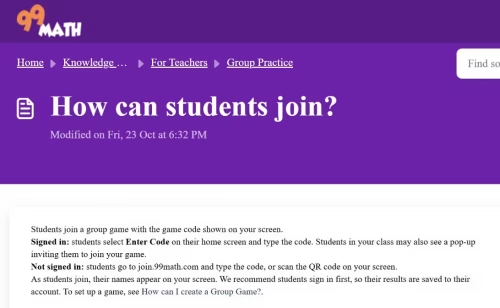
Official 99math instructions showing how students can join live classroom games using a game code or QR code.
What Is the Difference Between a Game Code and a Class Code?
A game code allows students to enter a particular live multiplayer session. It is displayed when the teacher sets up that activity.
A class code connects a student’s account to a teacher’s class, allowing them to access class-related activities and assignments.
For example, a child joining a one-off classroom competition needs the game code. A pupil connecting their account to a permanent class may instead need the class code.
These codes serve different purposes and should not be used interchangeably.
How Can Teachers Host a 99math Game?
Teachers can use 99math to organise short challenges during lessons, revision sessions or classroom warm-ups.
The platform allows educators to choose a mathematical skill, configure the activity and invite students to participate.
How to Set Up and Customise a Maths Game?
Teachers can follow these steps:
- Create a Teacher Account: Visit 99math.com and register as a teacher.
- Create or Select a Class: Add pupils manually or use supported classroom-import options.
- Open Group Practice: Select the group practice feature from the menu.
- Choose a Maths Skill: Select a topic from Math Facts or Curriculum Skills, or create a custom game.
- Configure the Game: Choose Classic or Teams mode, adjust the duration and select the number of rounds.
- Launch the Session: Select Play LIVE and share the displayed game code or QR code.
- Start the Game: Once at least three students have joined, begin the challenge.
The official hosting instructions describe an initial game configuration of approximately five minutes, with three rounds of around one and a half minutes each. Teachers can adjust the settings to suit their classroom activities.
There is also a Save for Later option for preparing a game before the lesson.
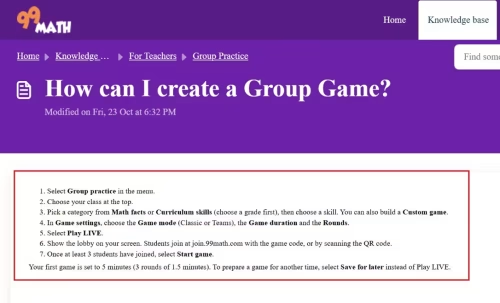
Official 99math hosting instructions explaining how teachers select maths skills, configure game modes and launch live classroom sessions.
How Can Teachers Track Student Performance?
After pupils complete a game, teachers can review their performance through the reporting tools.
Available information can include question accuracy, response speed, skill-level progress and patterns of mistakes.
These insights can help educators identify which topics need further attention.
For example, a pupil who answers multiplication questions correctly but slowly may need additional fluency practice.
Another pupil who repeatedly gives incorrect answers may benefit from revisiting the underlying concept before attempting further timed questions.
Teachers should use performance reports to guide instruction rather than treating leaderboard positions as a complete measure of mathematical ability.
More advanced reporting features, including additional printable reports, are available through premium licences.
Is 99math Free or Paid?
99math offers free access to its core classroom learning features, making it possible for teachers and students to participate without purchasing a subscription.
Free tools include live group practice, individual exercises, class management, assignments and standard performance reporting.
However, 99math also provides premium options for teachers, schools and families who want additional functionality.
What Is Included in 99math Free and Premium Plans?
| Feature | Free Version | Premium Options |
| Live Classroom Games | Included | Included |
| Individual Maths Practice | Included | Included |
| Homework Assignments | Included | Included |
| Standard Progress Reporting | Included | Included |
| Mixed-Skill Group Games | Limited | Enhanced Features |
| Personalised Learning Paths | Limited | Advanced Features |
| Printable Detailed Reports | Limited | Additional Reporting |
| Extra Pet Squad Rewards | Basic Access | Available With Parent Premium Pass |
99math offers two main premium licensing options for educational institutions.
Teacher Premium provides enhanced tools for an individual educator, while School Premium extends access across a school and includes additional support benefits.
Parents can separately purchase a Premium Pass for their child’s home-learning experience. This offers additional games and virtual rewards.
The exact subscription cost may vary according to the plan and purchasing arrangements. Schools should check the official pricing information before committing to paid services.
Importantly, a premium subscription is not required for ordinary live classroom games.
How Can Students Use 99math for Homework and Home Practice?
99math is not limited to classroom competitions. Students can also work independently, allowing teachers to reinforce specific mathematical skills between lessons.
How Can Teachers Assign Homework on 99math?
Teachers can create homework through the Individual Practice section.
The process involves selecting Assign Skill, choosing a class, identifying the relevant mathematical topic and determining the amount of practice required.
Assignments can be configured according to the number of questions or the amount of time students should spend practising.
Teachers can also assign activities to the whole class or selected students and choose optional starting dates and deadlines.
After an assignment is created, signed-in students can access it through their accounts. Teachers can also share an assignment link or use the supported Google Classroom sharing option.
According to 99math’s official instructions, assignments without a specified due date remain available for 14 days.
This flexibility makes individual practice useful for targeted support and regular homework without requiring the entire class to work at the same pace.
Can Parents Use 99math With Their Children?
Parents can use 99math to encourage regular mathematical practice at home and, where accounts are linked appropriately, monitor their child’s learning activity.
The home-learning experience includes Pet Squad, which combines maths challenges with virtual pets, progression and rewards.
Children can complete mathematical exercises while progressing through the game environment.
An optional Premium Pass provides additional rewards, decorative items and unlimited daily games. Free home accounts have a daily game limit.
Parents should also understand that Premium Pass subscriptions renew automatically unless cancelled.
For younger children, short, consistent practice sessions are generally more manageable than extended competitive gameplay.
Parents can support learning by discussing mistakes and encouraging improvement rather than focusing only on scores.
Why Is 99math Not Working and How Can You Fix It?
Although 99math is designed for convenient browser-based access, students and teachers may occasionally encounter problems with joining sessions, loading games or accessing accounts.
Many difficulties can be resolved by checking the game code, internet connection and account settings.
How to Fix Invalid Game Codes and Login Problems?
If a 99math game is not working, try the following solutions:
- Check the Game Code: Confirm that the code matches the one currently displayed by the teacher.
- Use the Correct Joining Page: Open join.99math.com when joining a live session without signing in.
- Check Whether the Game Has Started: Ask the teacher whether the session is active and accepting participants.
- Confirm the Code Type: Make sure you are using a game code rather than a class code.
- Refresh or Reopen the Page: Reload the browser if the screen freezes, provided the teacher confirms it is safe to reconnect.
- Check Your Internet Connection: A weak connection may interrupt live gameplay.
- Try Another Supported Browser: Update the browser or try a different compatible device.
- Contact School IT Support: School network filters may block the connections required by the platform.
99math provides an official Health Check page to help schools identify connection problems.
For students who cannot log in, teachers or parents should check the account details and use the appropriate password recovery process.
If problems continue across several devices on the same school network, the issue may involve network restrictions rather than individual accounts.
Is 99math Worth Using in UK Schools?
99math can be a useful supplementary learning tool for UK schools, particularly when teachers want students to practise mathematical fluency through interactive activities.
Its main advantage is the ability to turn short practice sessions into engaging classroom challenges while providing teachers with information about student performance.
The platform can complement approaches to technology-supported classrooms, where digital activities and personalised feedback are used alongside traditional instruction.
For primary schools in England, multiplication practice is particularly relevant.
Can 99math Help With Year 4 Multiplication Tables Practice?
England’s Year 4 Multiplication Tables Check assesses pupils’ ability to recall times tables up to 12.
According to the Department for Education, the statutory check consists of 25 timed multiplication questions, with pupils given six seconds to answer each question.
Teachers can use 99math’s multiplication exercises to provide supplementary practice and help pupils become more confident with number facts.
However, 99math is not the official Multiplication Tables Check application, and its games do not necessarily reproduce the exact format, timing or assessment conditions.
Schools should therefore combine digital practice with appropriate teaching and the official familiarisation activities where relevant.
What Are the Benefits and Limitations of 99math?
The main benefits of 99math include convenient access, interactive practice, immediate feedback and classroom reporting.
For teachers, it provides a practical way to organise short activities without manually marking every response. Students may also find the gaming format more appealing than repetitive written exercises.
However, there are limitations to consider.
Competition and time pressure can discourage some pupils, particularly those who need longer to process questions or who experience maths-related anxiety.
Likewise, answering arithmetic questions quickly does not necessarily demonstrate deeper understanding of mathematical reasoning.
Teachers should therefore combine 99math with discussion, written problem-solving and alternative learning activities.
As with other online assessment tools, accessibility, feedback quality and suitability for learners should be considered before widespread classroom use.
Is 99math Safe for Children?
99math states that it provides an advertising-free learning environment and maintains safeguards for student information.
The company also states that its services comply with relevant data-protection frameworks, including GDPR and the US Children’s Online Privacy Protection Act.
Nevertheless, schools should review the platform’s privacy policy, data-processing arrangements and safeguarding requirements before introducing it to pupils.
Parents should monitor how children use the platform, review account settings and ensure that participation remains appropriate for their age.
What Are the Best Alternatives to 99math?
Several educational platforms provide different approaches to interactive maths practice.
Kahoot! supports teacher-led quizzes across multiple subjects, while Blooket combines questions with various game formats.
MathsFrame offers curriculum-related maths activities that may be particularly relevant to UK primary pupils.
Times Tables Rock Stars focuses specifically on developing multiplication and division fluency through repeated practice.
The most suitable option depends on whether teachers prioritise multiplayer competition, curriculum-specific questions, independent learning or detailed performance tracking.
Conclusion
99math provides teachers, students and parents with a convenient way to make regular mathematical practice more engaging.
Its combination of multiplayer challenges, independent exercises and performance reporting makes it particularly useful for reinforcing arithmetic skills.
The availability of free classroom games also makes the platform accessible to schools that want to experiment with digital learning without committing to premium subscriptions.
For UK educators, 99math works best as a supplementary teaching resource rather than a replacement for structured maths lessons.
By selecting appropriate activities, reviewing student progress and balancing competition with understanding, teachers can use the platform to support mathematical confidence and fluency.
Students and parents can get started through the official 99math website, while teachers can explore its classroom tools to decide which features best suit their learning objectives.
Frequently Asked Questions About 99math
1. Do Students Need an Account to Play 99math?
No. Students can join a live classroom game using a teacher-provided code without signing in, although an account is recommended for saving progress.
2. Can You Play 99math Without a Teacher?
Yes. Students can access individual and home-learning activities without participating in a live teacher-hosted game.
3. Is 99math Completely Free?
Core features, including live classroom games and individual practice, are free. Optional premium subscriptions provide additional educational features and home-game rewards.
4. Can You Play 99math on a Mobile Phone?
Yes. Students can access live games through a compatible mobile browser. The platform also offers mobile apps for certain home-learning activities.
5. How Many Students Can Join a 99math Game?
A live group game requires at least three participants. According to 99math, there is no fixed upper participant limit imposed by the platform, although network performance can affect capacity.
6. Can Parents Track Their Children’s Progress on 99math?
Yes. Parents can link supported accounts and review their children’s learning activity and progress through the available parental features.
7. Is 99math Suitable for UK Primary School Students?
Yes. Many activities cover number facts, multiplication and other skills relevant to primary mathematics, although teachers should check their alignment with UK curriculum requirements.